Returns & Exchanges
How to Manage Shopify Returns Without Losing Track of Inventory
After a Shopify return, inventory stays accurate when you treat the return as a stock movement—not only a refund ticket. Shopify does not restock when the shopper submits a request. Available quantity changes when you process the return and choose whether each unit returns to a sellable location.
Keep three records aligned: the customer return, the physical unit (quarantine vs shelf), and Shopify’s available quantity. When those drift apart, you oversell sizes you already refunded, promise exchanges that are gone, or “restock” units that are still waiting for inspection.
Practical Shopify returns inventory management follows one path: request → receive → inspect → restock or write off → update inventory (and fulfill any exchange as a separate outbound task). Structured portals and eligibility rules reduce manual intake mistakes; they do not replace dock inspection or a cycle count when the shelf and Shopify still disagree.
This guide pairs with Binly’s how to recount stock after returns in Shopify—two related processes, not the same job. Below we focus on structuring returns and restock decisions; later we cover when a physical recount is the right next step.
What happens to inventory when a Shopify order is returned?
Shopify does not put inventory back on the shelf when a customer opens a return request. Stock changes when you process the return and choose a restock decision for each line.
In practice:
- Request / create — return opens; inventory unchanged.
- Approve / open — customer may ship; inbound stock still unchanged.
- Receive and inspect — your team confirms what arrived and its condition.
- Process — confirm quantities, settle refund/credit/exchange balance, and choose whether each unit is restocked at a location—or not.
- Exchange release (if any) — fulfill the replacement after you process the return; if the customer still owes a balance, Shopify can hold that fulfillment until payment is handled.
Restock is optional and location-specific. When you process a return in Shopify, you can choose Restock at and pick a location. Restocking before inspection—or at the wrong location—creates ghost stock. Refunding without restocking leaves Shopify low if the unit later goes back on a sellable shelf.
Returned, inspected, restockable, and damaged are not the same
| State | Inventory implication |
|---|---|
| Returned (in transit / at dock) | Not sellable yet |
| Inspected | You can decide whether to restock |
| Restockable | Add back at the correct location |
| Damaged / not restockable | Do not inflate available inventory |
Treat quarantine as a physical bin, not a Shopify status. Photos help triage damage claims; they do not replace dock inspection.
Why personalized and made-to-order products rarely restock cleanly
Engraved, customized, monogrammed, and made-to-order items usually belong to one customer. Putting them back into available inventory can list a one-off SKU for sale—or create recount noise when the unit stays quarantined forever.
- Use eligibility rules (for example product tags) to mark personalized or final-sale SKUs as non-returnable, or limit them to store credit / remake paths your policy supports.
- If you must accept a personalized return (defect or damage), inspect it and do not add it back to available inventory unless you have an outlet or remake workflow.
- Keep those units out of sellable bins and note the exception on the return record.
How exchanges complicate inventory management
An exchange is two movements: inbound return + outbound replacement.
- Shopify does not reserve exchange-item inventory until you process the return, so a size available at submit can sell out before process.
- Shipping the replacement before inspection—or restocking a damaged original—creates messy stock.
- Price differences are financial: Shopify calculates refund vs balance due when you process.
- High-volume size swaps drift fastest when receive → inspect → restock is skipped.
Only offer replacements available for sale, and re-check stock at approval and before process.
Five best practices for Shopify inventory accuracy after returns
- Separate intake from restock. Structured requests help; restock only after receive and inspect.
- Decide per line. Add sellable units back at a named location, or keep them out of available inventory. In Shopify you can process a return partially when only some units are ready to restock.
- Restock where the unit lives. Prefer the receiving location—not the original fulfillment location by habit.
- Keep damaged and pending returns out of sellable bins.
- Close exchanges as two tasks: inbound restock decision + outbound fulfillment. If the replacement sold out, change the resolution before promising shipment.
How Souvely Returns & Exchanges helps
Souvely Returns & Exchanges organizes the customer and merchant side of returns—not warehouse cycle counts.
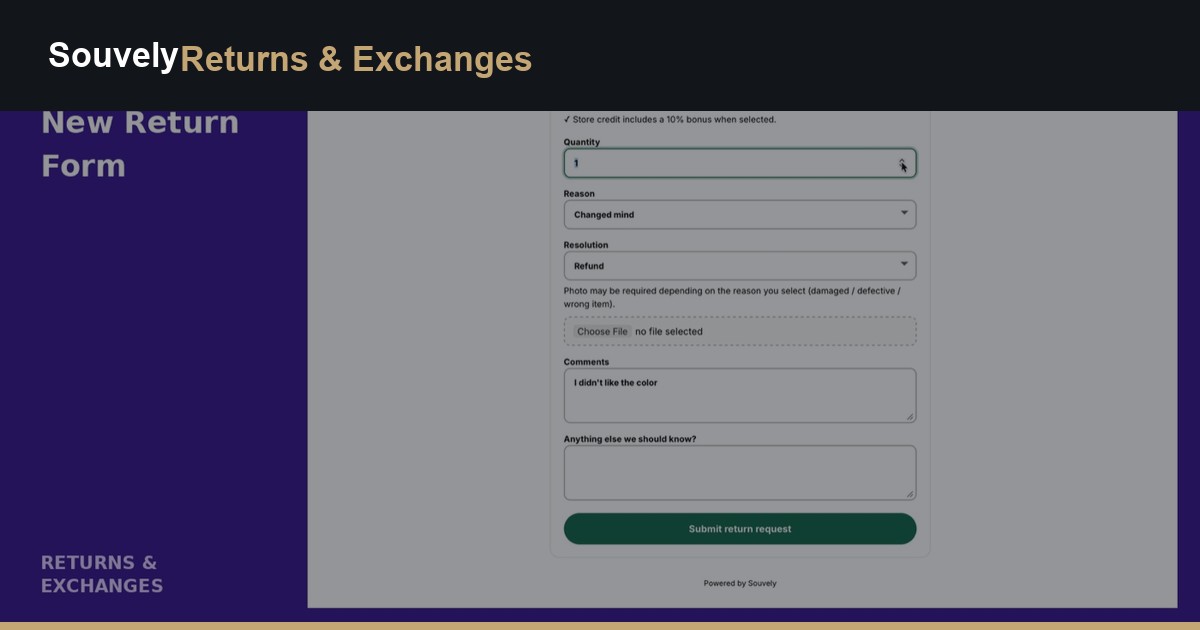
Customer return request form—intake for items, reason, resolution, and optional photos before anything is restocked.
It supports:
- Self-serve intake on
/apps/returns - Eligibility rules for return windows, non-returnable / personalized items, allowed resolutions, and photo requirements where you enable them
- A merchant queue from request through receive and process
- Restock choices when you process—add items back to inventory at an available location, or leave them unrestocked
- Exchange intent at submit, with replacement variants limited to those available for sale
It does not run physical stock counts, detect damage from photos, buy prepaid labels, or quietly sync the shelf. Inventory returns to Shopify only when you process a return and choose to restock after inspection. See the returns product page.
When inventory recounting becomes necessary
Recount when process discipline is not enough: repeated oversells after returns spikes, restocking before inspection, refunds without restock, messy location handoffs, period close, or exchange sizes that keep drifting.
Managing return requests and verifying physical inventory are related but distinct. One decides whether a unit should return to sellable stock. The other measures the shelf and corrects Shopify when the ledger and the room disagree.
How Binly complements a structured returns workflow
Once returns are organized, you still need a way to verify counts when variance appears.
Binly covers the recount side of this problem: count with a phone, review differences against Shopify, and apply adjustments only after review—so quantities change when you approve the count, not mid-scan. Their article also walks through a returns shelf, restock-or-write-off decisions, and a weekly scan of only the SKUs that came back.
- Souvely (or your returns process) owns intake, approvals, exchanges, processing, and restock decisions.
- Warehouse SOPs keep quarantine and sellable stock separated.
- Binly owns cycle counts and recounts when shelf and Shopify diverge—especially on SKUs hit hardest by returns.
Returns software should not pretend to be a stocktake tool; a stocktake tool should not pretend to run your return portal.
How automation helps—without replacing warehouse judgment
A returns portal and eligibility rules cut retyping and policy exceptions at intake. Automated notifications and clear statuses help the team know what is waiting for receive, inspect, or process. That reduces common mistakes like refunding without a restock decision or promising an exchange size that was never re-checked.
Automation does not inspect the carton, grade damage, choose the correct restock location, or prove the shelf matches Shopify. Those steps stay with your warehouse process—and with a recount tool when variance remains.
Returns-to-restocking checklist
- [ ] Request exists with lines, reason, and resolution; exchange target still available for sale.
- [ ] Match package → count units → quarantine until inspected.
- [ ] Grade each unit: sellable, repair, damaged, vendor claim, or personalized/non-restockable.
- [ ] Restock only sellable units at the location where they sit; keep others out of available inventory.
- [ ] Complete financial outcome and exchange fulfillment as separate tasks.
- [ ] If variance remains, focused count → recount large gaps → fix the process cause.
Conclusion
Treat every return as both a customer resolution and a stock movement. Inspect before you restock. Make restock decisions explicit. Handle exchanges as inbound plus outbound. When the shelf and Shopify still disagree, recount.
Souvely Returns & Exchanges keeps the return workflow organized so restock decisions happen on purpose. Binly helps verify physical quantities when variance remains. Together with clear warehouse habits, that is practical Shopify returns inventory management.
Related reading: Add a returns and exchanges portal · Set up store credit for Shopify returns · Offer exchanges instead of refunds · Returns product page · Returns FAQ
Make returns easier for your customers and your team. Explore Souvely Returns & Exchanges—or install from the Shopify App Store (first install includes a 30-day full-access trial).