Returns
How to Add a Returns and Exchanges Portal to Shopify
Most Shopify stores still take returns over email: “What’s the order number? Which size? Photo?” You retype everything into admin while the shopper waits. A dedicated portal keeps the request structured—items, reason, preferred resolution—and hands you a reviewable return in Shopify.
Native Shopify returns tools help you process returns once they exist. They do not replace a branded, self-serve returns and exchanges portal on your storefront. That is where Souvely fits.
What you need before the portal works
- Install Souvely: Returns & Exchanges.
- Confirm the App Proxy path
/apps/returnsis available on your shop (Souvely’s default). - Decide how shoppers will find the portal: email link, theme block, and/or Customer Account entry.
- Review seeded eligibility rules so the first test order behaves as you expect.
Installing the app alone does not teach every customer where to go. You still need a clear link in post-purchase emails or navigation.
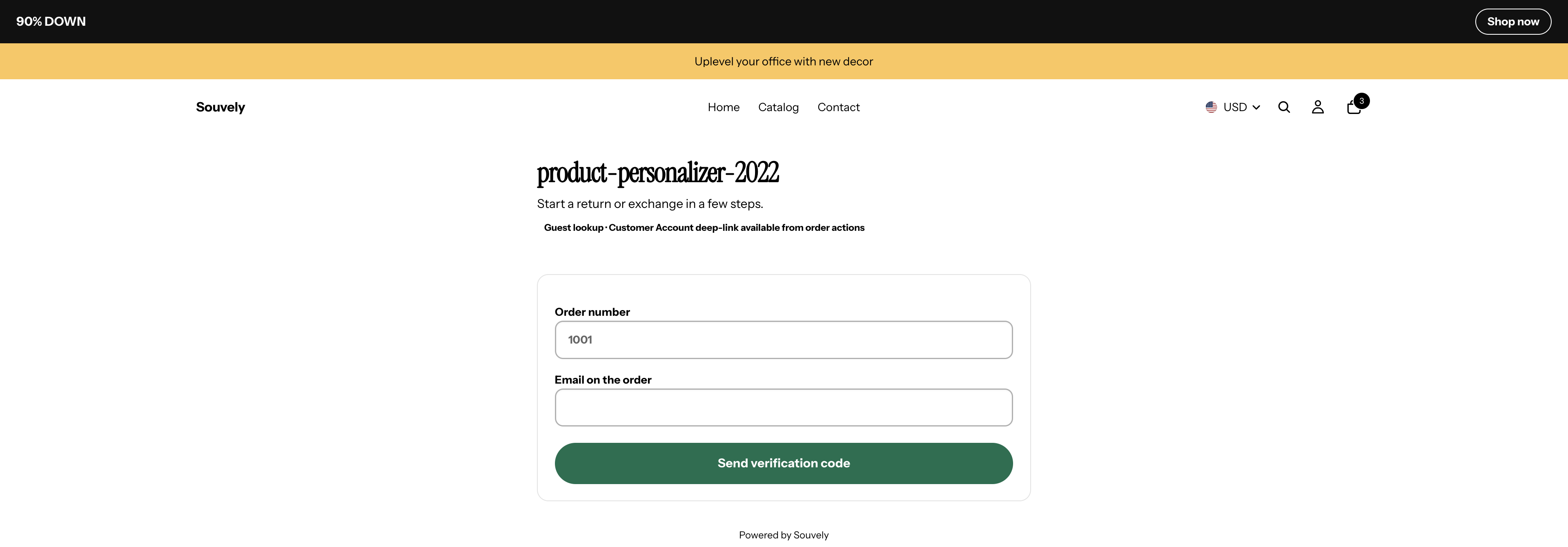
Demo storefront (product-personalizer-2022): guest lookup on /apps/returns before verification. Customer Account deep-link remains optional and shop-specific.
Step 1 — Install and open the merchant app
- Install from the Shopify App Store listing.
- Complete any required merchant agreements in the app.
- Open the Souvely admin home so the shop record and default rules can seed.
First install includes a one-time 30-day full-access trial with Pro features and unlimited return requests. Approving Growth or Pro ends that trial and starts billing. Reinstalling does not restart it.
Step 2 — Share the portal URL
Shoppers use your storefront App Proxy URL:
https://YOUR-SHOP.myshopify.com/apps/returns
(or the same path on your custom domain, depending on how Shopify routes the proxy).
Ways to publish it:
- Paste Souvely’s email HTML snippet into Order confirmation and Shipping confirmation notifications.
- Add the theme app extension returns portal link block where shoppers look for help.
- Optionally enable the Customer Account UI extension so logged-in buyers can start a return from an order action.
Customer Account note (qualified): the extension ships in the app and can deep-link into the portal when New customer accounts and Partner/extension capabilities are working on your shop. Live deep-link behavior should be verified on your storefront after install. Guest lookup with order number + email on the order remains the reliable baseline even if account deep-links need theme or capability checks.
Step 3 — Walk a test request end to end
- Place (or use) a fulfilled test order.
- Open
/apps/returns, enter order number and email, and load returnable items. - Choose a reason and a resolution (refund, store credit, or exchange where allowed).
- Submit, then open the request in Souvely → Returns and approve or reject as you would in production.
After approval, Souvely creates the Shopify return and you continue through receive → process using Shopify’s suggested financial outcome for refunds, store credit, or exchanges.
Portal troubleshooting
| Symptom | Likely cause | What to try |
|---|---|---|
| Portal 404 / blank proxy page | App Proxy not active or wrong path | Confirm Souvely is installed; open /apps/returns (not a custom invented path); re-check app status in Shopify admin |
| “No returnable items” / empty list | Lines not fulfilled, already returned, or blocked by rules | Fulfill the test order first; confirm the item is not final-sale / out of window; review Rules |
| Order not found | Wrong order name or email mismatch | Use the exact order number Shopify shows and the email on the order (not a different account email) |
| Monthly request blocked message | Free-plan calendar-month cap after trial | Wait for next month, or move to Growth/Pro; trial unlocks unlimited only during the first-install window |
| Customer Account “Start return” fails | Extension / network / New customer accounts setup | Fall back to guest /apps/returns lookup; confirm New customer accounts; re-test the order action on a logged-in buyer |
| Status link does nothing useful | Looking at the wrong URL | Use the secure token status link from the submit confirmation—not a guessed admin URL |
Still stuck? Email support@souvely.com with your shop domain, that you use Returns & Exchanges, and the step that failed.
What the portal does (and does not)
Does
- Self-serve lookup and structured request intake
- Eligibility filtering from your rules
- Public status page via a secure token link
- Support for refund, store credit, same-product variant exchange, and another-product exchange (Shop Now) when rules allow
Does not (current product)
- Automatically purchase prepaid carrier labels (shipping is manual instructions today)
- Auto-approve every request without merchant review
- Replace your published return policy page—you still need clear policy copy on the storefront
Hypothetical example
Example (illustrative): An apparel brand pastes the portal link into shipping confirmation emails. A buyer who ordered a Medium opens /apps/returns, selects the hoodie, chooses “Wrong size,” picks exchange for Large, and submits. Support approves once; no inbox ping-pong for SKU and size.
Common mistakes
| Mistake | Fix |
|---|---|
| Installing but never linking the portal | Add email snippet and/or theme link block |
| Testing with unfulfilled lines | Returns need returnable fulfillments—fulfill the test order first |
| Promising prepaid labels in policy copy | Souvely provides manual return instructions; update policy language accordingly |
| Skipping rules review | Adjust window and resolutions before real traffic |
| Treating Customer Account as required | Ship guest lookup first; treat account deep-link as optional after you verify it |
Related reads
- How to Set Up Return Eligibility Rules in Shopify — windows, tags, countries, and resolution limits that the portal enforces.
Also useful: Returns product page · Returns FAQ · Pricing
Want a self-serve returns portal on Shopify? Start with Souvely Returns & Exchanges—first install includes a 30-day full-access trial. After the trial, Free allows up to 5 new return requests per calendar month; Growth is $29/mo and Pro is $79/mo for unlimited volume.